Helping ambitious WFH dads protect both deep work and family time. Get the free newsletter helping 700+ dads build a workday that fits inside their life, not the other way around. PLUS: Access my free WFH Dads Productivity Playbook when you sign up.
Share
Video calls say more about you than you think
Published about 21 hours ago • 5 min read
👋 Hey Reader!
Here’s what I’ve got for you in today’s issue of WFH Dads:
→ The first impression you make on a video call
→ Recommendation of the week - My productive home office tour
Let's get into it.
Video calls say more about you than you think
If you find yourself getting on Zoom, Teams, or Google Meet calls with potential clients or higher ups at your company, you have to understand this: the way you show up on those calls leaves an impression.
It goes beyond what you're wearing or how confident you sound.
It's also your camera, your audio, your lighting, your framing.
This leaves a different impression:
Than this:
My actual setup on Zoom calls
So even if you aren't a content creator in your day job like I am, it's worth investing a few hundred dollars in some basic equipment to level up the professionalism of your video calls.
Audio
You don't want to be the person people are struggling to understand because your audio is so bad that the 'isolation' and voice cancellation technology is making you sound super warbled and digitized.
A proper microphone will solve that.
The Maono PD200W mic is fantastic for about $100. It sounds great and it works wirelessly which is super rare for these types of 'podcast style' microphones (though it can also plug in via USB-C connection and traditional XLR).
I've linked to the version that comes with the 'boom arm' instead of just the regular stand so you can push it out of the way more easily when you're not using it and so it takes up less desk space.
Here's a great review of it where you can hear how it compares to other similar mics of that style.
Lighting
If you can arrange your desk so that there is a window in front of you and natural light is coming in, that's the simplest thing. But you also don't want your lighting to be completely dependent on how sunny of a day it is.
I recommend getting the Elgato Key Light Neo. You can adjust how bright it is, you can adjust the color (I'd lean more towards white than yellow), and it's super compact.
I've never been a fan of most webcams because they generally just kind of suck. I started using my professional video camera as a webcam years ago because it was the only way I could get that nice blurry background that webcams historically just couldn't do.
But now there are webcams that can give you that nice blurry background!
The YoloCam S3 is the webcam I recommend. It's small, relatively inexpensive ($200), and most importantly, gives you that sweet, sweet, blurry background.
Here's a great video that shows what the webcam footage looks like as well as how to best dial in the settings.
Backdrop
Most people just put up a virtual background and call it a day. That's fine (and better than doing the artificially blurred background where you're just sitting in a huge blurry mess like my example above) but the background is such an opportunity to stand out in a sea of sameness.
Most of the comments I get about my setup are a result of the thought I put into what's behind me when I'm on a call (though the camera, mic, and lighting help).
Here's a few things to keep in mind:
a white wall is fairly dull; throw SOMETHING on the walls
have something that could serve as a conversation piece
play guitar? have a guitar up on the wall
do martial arts? have a boxing glove or colored belt visible
really into Lord of the Rings? have your LOTR Funko Pops on display
This video does a great job of explaining what to consider when setting up your background. It's targeted to people wanting to build a YouTube studio but the principles are the same.
The takeaway
If you're only meeting with team members to work through current projects, or you're cam off, mic off 95% of the time, you probably don't need any of this.
But if you are meeting with people you want to make an impression on, or just want to level up your setup for the sake of your own professionalism, here's what I recommend you prioritize:
Prioritize the mic if anyone's ever told you 'I can't really understand you.'
Prioritize the light if you aren't facing a window
Prioritize the camera if you've always wanted a real blurry background
Prioritize the backdrop if you want people to say 'wow, love the pro setup!'
I feelthis postsums up why your video call setup may be worth the investment:
Would love to hear what you think though. Do you feel you could benefit from leveling up your video given your role? Or is it less of a priority?
Recommendation of the week
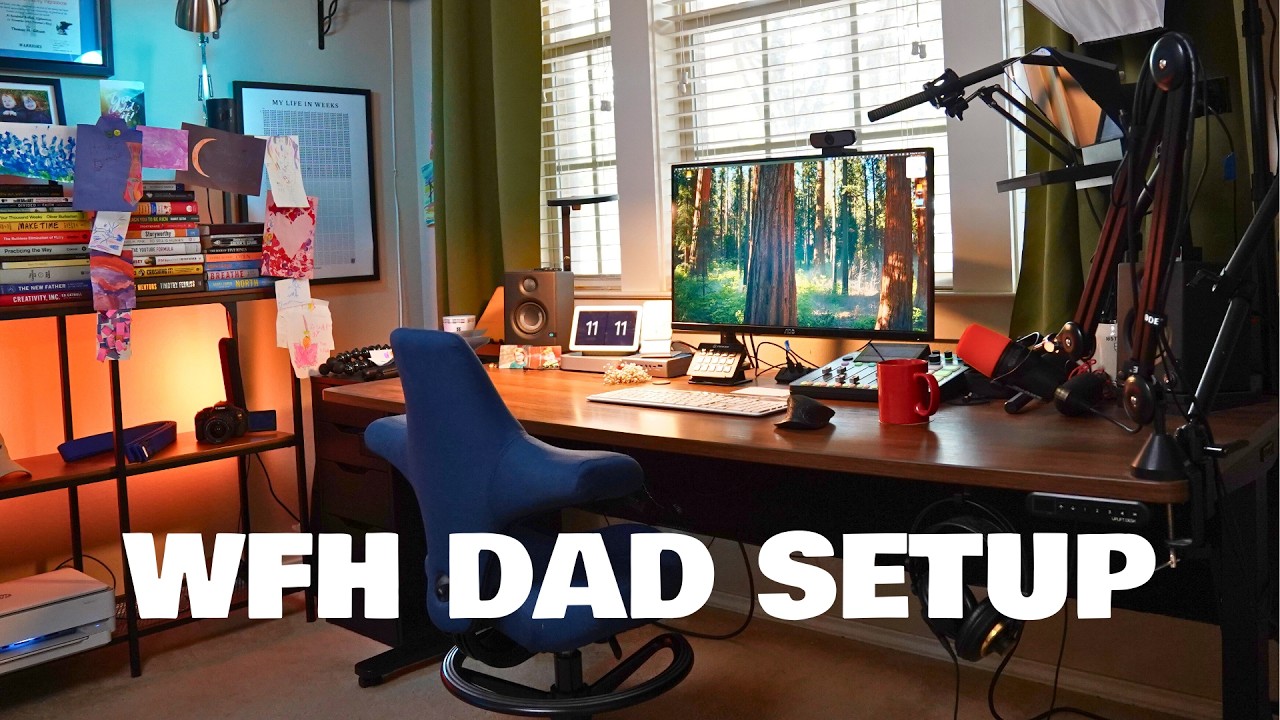
My productive home office tour
If you really want to do a deep dive on all the tech and gear I have in my office (which goes beyond the basics I've mentioned above given my role), then check out my full home office tour!
I'm running a 4-week Workday Reset program in January 2027 to help ambitious WFH dads like yourself build a workday that fits around your life (so you can stop working nights and weekends).
If you'd like to be the first to learn about it when registration opens (and get the lowest rate available), join the waitlist.
Helping ambitious WFH dads protect both deep work and family time. Get the free newsletter helping 700+ dads build a workday that fits inside their life, not the other way around. PLUS: Access my free WFH Dads Productivity Playbook when you sign up.
👋 Hey Reader! Here’s what I’ve got for you in today’s issue of WFH Dads: → Finding time for a hobby as a WFH dad → Recommendation of the week - A high-protein, low calorie Fruity Pebbles breakfast Let's get into it. Finding time for a hobby as a WFH dad I recently asked on Threads what hobbies fellow WFH dads had. Here were some of the answers: build a side-hustle* develop a game or app hit up the gym play music build LEGO sets attend their favorite team's games do woodworking write books...
👋 Hey Reader! Here’s what I’ve got for you in today’s issue of WFH Dads: → Are your kids using AI? → Recommendation of the week - My favorite AI podcast Let's get into it. Are your kids using AI? I recently listening to a podcast sharing some tragic stories of kids and teens who had developed relationships with AI companion bots that led to them taking their own lives. Really heartbreaking stuff. My kids are still pretty young but it got me thinking about what level of interaction I want them...
👋 Hey Reader! Here’s what I’ve got for you in today’s issue of WFH Dads: → A simple way to reflect on your life → Recommendation of the week - My journaling notebook and pen of choice Let's get into it. A simple way to reflect on your life My journaling practice has gone through a lot of iterations over the years, and I recently found myself trying to journal about too much, too often. Then when I read the book Tiny Experiments, I learned about a reflective practice that helped simplify...